
 Facebook
 Twitter
 RSS
RSSמדריך ASP.NET – בניית Master Page
כאשר נבנה מערכת Web, נרצה שהעמודים השונים יהיו בעלי אותה תבנית, לעיתים נרצה לשלב בכל העמודים את אותו אזור לתפריט, כותרות ופרטים כלליים על האתר.
לשם בניית התבנית הזו נוכל להעזר ב – Master page. Master page הוא קובץ בעל סיומת Master המהווה את התבנית לעמודים השונים.
במדריך זה נראה כיצד בונים Master page וכיצד משלבים אותו בדפים השונים
יצירת Master Page
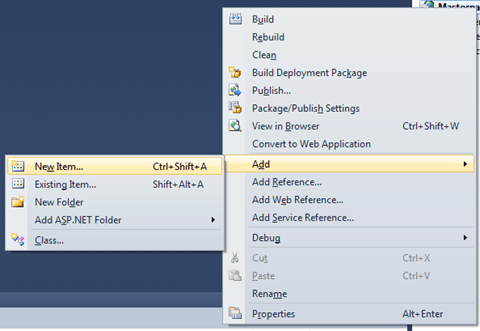
בפרוייקט שלנו נבחר ב – Add New Item
בתפריט שנפתח נבחר ב – Master Page

ניתן לקובץ שם, לצורך ההדגמה קראנו לקובץ Site.Master. נתבונן בקוד שנוצר לנו באופן אוטומטי:
<%@ Master Language="C#" AutoEventWireup="true"
 CodeBehind="Site.master.cs" Inherits="Demos.Site" %>

<!DOCTYPE html PUBLIC "-//W3C//DTD XHTML 1.0 Transitional//EN"
  "http://www.w3.org/TR/xhtml1/DTD/xhtml1-transitional.dtd">

<html >="http://www.w3.org/1999/xhtml">
<head runat="server">
    <title></title>
    <asp:ContentPlaceHolder ID="head" runat="server">
    </asp:ContentPlaceHolder>
</head>
<body>
    <form id="form1" runat="server">
    <div>
        <asp:ContentPlaceHolder
          ID="ContentPlaceHolder1" runat="server">

        </asp:ContentPlaceHolder>
    </div>
    </form>
</body>
</html>
שימו לב לתגים asp:ContentPlaceHolder , נשוב אליהם בהמשך. בינתיים נראה שנוצר לנו קובץ עם תוכן דומה למה שנוצר ב – ASPX ואנחנו יכולים להוסיף לו פקדים כראות עינינו.
לצורך ההדגמה נוסיף Label לפני ה – ContextPlaceHolder השני והקוד יראה כך:
<%@ Master Language="C#" AutoEventWireup="true"
 CodeBehind="Site.master.cs" Inherits="Demos.Site" %>

<!DOCTYPE html PUBLIC "-//W3C//DTD XHTML 1.0 Transitional//EN"
  "http://www.w3.org/TR/xhtml1/DTD/xhtml1-transitional.dtd">

<html >="http://www.w3.org/1999/xhtml">
<head runat="server">
    <title></title>
    <asp:ContentPlaceHolder ID="head" runat="server">
    </asp:ContentPlaceHolder>
</head>
<body>
    <form id="form1" runat="server">
    <div>
        <asp:Label ID="Label1" runat="server"
          Text="Your Content Here:"  />
        <asp:ContentPlaceHolder
          ID="ContentPlaceHolder1" runat="server">

        </asp:ContentPlaceHolder>
    </div>
    </form>
</body>
</html>
הוספת דף עם תבנית
נבחר שוב ב – Add new item ובתבנית נבחר ב – Web Form using Master Page
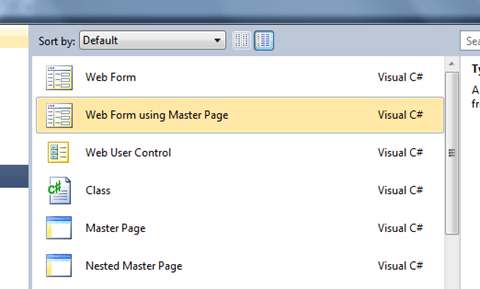
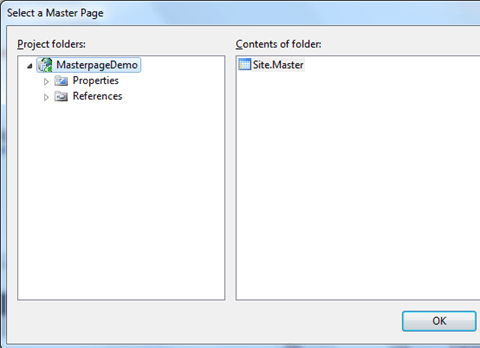
ניתן לו שם, אנחנו לצורך ההדגמה קראנו לו MyContentPage.aspx כעת, עלינו לבחור מהו ה – Master Page בו הדף החדש שלנו משתמש, היות וקיים לנו בפרוייקט רק Master Page אחד, נבחר בו, ונלחץ OK .
נתבונן כעת בקוד שנוצר לנו באופן אוטומטי בדף החדש:
<%@ Page Title="" Language="C#" MasterPageFile="~/Site.Master"
  AutoEventWireup="true" CodeBehind="myContentPage.aspx.cs"
  Inherits="Demos.myContentPage" %>
<asp:Content
  ID="Content1" ContentPlaceHolderID="head" runat="server">
</asp:Content>
<asp:Content ID="Content2"
  ContentPlaceHolderID="ContentPlaceHolder1" runat="server">
</asp:Content>
נראה בשורה הראשונה את המאפיין MasterPageFile המצביע על ה – Master Page ושני פקדי תוכן (asp:Content). לפקד asp:Content ישנו מאפיין בשם ContentPlaceHolderID, תפקיד המאפיין הזה הוא להצביע על הפקד asp:ContentPlaceHolder.
נוסיף Label בתוך פקד התוכן השני וניתן לו גם צבע רקע על מנת להבדילו. הקוד בדף שלנו יראה כך:
<%@ Page Title="" Language="C#" MasterPageFile="~/Site.Master"
  AutoEventWireup="true" CodeBehind="myContentPage.aspx.cs"
  Inherits="Demos.myContentPage" %>
<asp:Content
  ID="Content1" ContentPlaceHolderID="head" runat="server">
</asp:Content>
<asp:Content ID="Content2"
  ContentPlaceHolderID="ContentPlaceHolder1" runat="server">
  <asp:Label ID="Label1" Text="This is from the content page"
    BackColor="YellowGreen" runat="server" />
</asp:Content>
כעת, נראה את הדף ע"י הקלקה ימנית ובחירה ב – View In Browser:

וזה מה שהתקבל בדפדפן:

וב – HTML:
<html >="http://www.w3.org/1999/xhtml">
<head><title>

</title>
</head>
<body>
  <form method="post" action="MyContentPage.aspx" id="form1">
    <div class="aspNetHidden">
      <input type="hidden" name="__VIEWSTATE" id="__VIEWSTATE"
        value="/wEPDwULLTE1MjQ5ODA0NjlkZAtf8DceGtYv0R7C9YhfJh50
sSVzW/gHz3gnws5Rw9DL" />
    </div>
    <div>
      <span>Your Content Here:</span>
      <span style="background-color:YellowGreen;">
This is from the content page</span>
    </div>
  </form>
</body>
</html>
ניתן לראות כאן שחלק מה-HTML הגיע מה – Master Page וחלק מהדף עצמו. ניתן להוסיף דפים נוספים המשתמשים באותו Master Page ולשנות את תוכנם.
ניתן לשנות את התוכן של ה – Master Page ולראות איך כל הדפים שהוספנו ושמשתמשים בו, תוכנם משתנה בהתאם.

תגובות בפייסבוק